
Industrial cooling fans are essential to maintaining stable thermal conditions in demanding environments such as factories, data centers, telecom systems, and OEM equipment. Designed to deliver consistent airflow under high static pressure, both axial and centrifugal fans play a critical role in preventing overheating and ensuring system reliability.
However, over time, mechanical wear, electrical faults, and environmental factors can lead to serious issues. If your cooling fan is not working, producing abnormal noise, excessive vibration, or failing to start, it can quickly result in unplanned downtime and equipment failure.
Whether you're troubleshooting a fan not working in an industrial system or dealing with a defective electric fan, this guide is built for engineers, technicians, and facility managers. It provides step-by-step diagnostics, explains when industrial fan repair is viable, and helps restore optimal performance efficiently. This guide covers cooling fans troubleshooting and industrial fans troubleshooting, helping identify root causes and implement effective repair solutions.

Replace Faulty Fans with UL-Certified Industrial Units Built for Continuous Duty
If troubleshooting reveals motor burnout, bent shafts, or performance below spec, replacement is the smarter long-term choice. Sofasco's AC and DC axial fans with die-cast aluminum housings, glass-reinforced impellers, and long-life ball bearings are engineered for 24/7 industrial operation.
Shop Replacement Fans Get Cross-Reference HelpWhat Causes a Cooling Fan Not Working?
A cooling fan not working is typically caused by power supply issues, motor failure, capacitor faults, or airflow blockage. In industrial systems, problems like voltage imbalance, bearing seizure, or thermal overload protection can also prevent the fan from starting. Identifying the root cause early helps avoid overheating, equipment damage, and unplanned downtime.
What to Do When Your Cooling Fan is Not Working: Step-by-Step Diagnostics
When a cooling fan is not working, immediate diagnosis is required to prevent overheating and system failure. Industrial cooling fans can fail due to electrical faults, mechanical wear, or airflow restrictions. Use the structured process below to quickly identify the root cause.
1. Verify Power Supply and Voltage
A primary reason for a fan not working is incorrect or unstable power input.
- Ensure the supply voltage matches the fan’s rated specifications (AC, DC, or EC)
- Check for phase imbalance in industrial systems
2. Inspect Electrical Wiring and Terminals
- Look for loose connections, damaged cables, or burnt terminals
- Check fuses and terminal blocks for continuity
3. Test the Motor Capacitor For AC Fans
A failed run capacitor is a frequent culprit in AC axial and centrifugal blowers. If the capacitor is dead, the motor will not have the torque required to spin the impeller.
- Use a multimeter to test capacitance
- Replace if outside tolerance
4. Check for Jammed Bearings
- Turn off the power and rotate the impeller manually
- If resistance is present, bearings may be seized due to wear or contamination
5. Evaluate Thermal Protection
Many industrial cooling fans include thermal overload protection.
- Allow the motor to cool before restarting
- Identify and resolve the root cause of overheating
Common Cooling Fan Problems in Industrial Systems
Most cooling fan problems fall into predictable failure categories:
1. Humming Sound from the Motor
Causes:
- Misalignment between the motor and the housing
- Loose mounting components
- Incorrect electrical supply
- Bearing wear
Solutions:
- Realign the motor and secure the mounting
- Tighten fasteners and inspect the electrical input
- Replace worn bearings if necessary
2. Overheating
Causes:
- Dust and debris buildup are restricting airflow
- Blocked vents or airflow paths
- Incorrect voltage supply
- Overloaded motor
Solutions:
- Check the airflow: If the airflow is blocked, it can cause the fan to overheat.
- Check the fan blades: If the blades are damaged, they may not be able to move the air effectively, causing the fan to overheat.
- Clean motor: Clean dirt and obstructions from cooling vents.
- Check the fitment of the cooling fan.
- Check the motor: If the motor is damaged, it may not be able to spin the blades correctly, causing the fan to overheat.
- Check the bearings: If the bearings are damaged, they may not be able to rotate the fan.
3. Excessive Vibration
Causes:
Some of the most common causes of excessive vibration in centrifugal fans include unbalanced blades, worn bearings, misaligned housing, and a damaged impeller or a bent motor shaft.
Solutions:
- Check to see if the fan blades are damaged or out of balance: If so, you'll need to replace the blades or balance them accordingly.
- Check the alignment of the fan: The fan must be properly aligned with the shaft it is mounted on. If it is not, you need to realign it.
- Check if the fan housing is damaged: This may cause excessive vibration. In this case, you need to replace the housing.
- Lastly, make sure that the fan is firmly mounted in place.
In addition to the above, you can perform the following steps:
- Clean the blades of the fan for any foreign objects that may be causing excessive vibration.
- Check the blades for any cracks, chips, or other damage.
4. Reduced Airflow or Poor Cooling Performance
Causes
- Dirty blades or filters
- Airflow obstruction
- Incorrect fan selection for pressure or airflow
- Fan rotating in the wrong direction
Solutions
- Clean blades and airflow paths
- Remove blockages in ducts or enclosures
- Verify airflow and static pressure requirements
- Check fan rotation direction
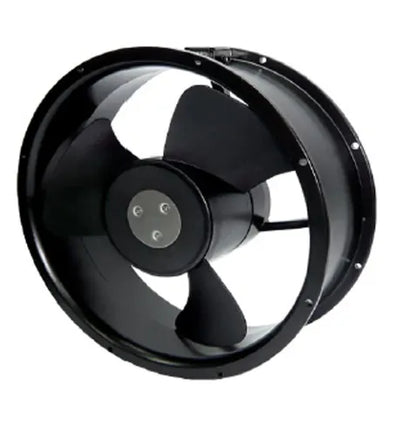
High-performance AC axial fans with die-cast aluminum housing, glass-reinforced impeller, and long-life ball or sleeve bearings. Ideal for industrial cooling applications.
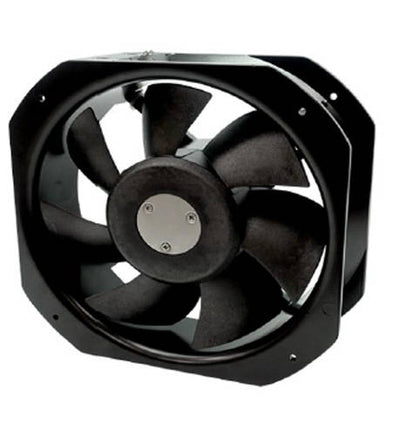
Durable AC axial fan with thermally protected capacitor motor, aluminum housing, and glass-reinforced impeller. Suitable for commercial and industrial systems.
How to Fix Electric Fan Motor Issues
Understanding how to fix electric fan motor failures can save facilities significant replacement costs. While some motor issues are terminal, others can be resolved with targeted maintenance:
- Realignment: If you hear a loud humming sound, the motor may be misaligned, causing the impeller blades to strike the housing. Realigning the motor mount and securing the structural fasteners often eliminates the vibration.
- Bearing Lubrication and Replacement: For motors generating high-pitched squealing or grinding, replacing worn ball bearings is a standard repair process that restores balance and reduces mechanical friction.
- Clearing Airflow Blockages: A motor that works too hard against severe static pressure or blocked cooling vents will draw excessive current. Cleaning the fan housing, shrouds, and ductwork reduces the aerodynamic load on the motor.
- Electrical Component Replacement: If troubleshooting reveals a faulty capacitor or a damaged terminal block, these components can be swapped out without replacing the entire fan assembly.
Centrifugal Fan Repair: Common Issues and Fixes
Centrifugal fan repair requires attention to high-pressure airflow systems commonly used in HVAC and industrial applications.
Common Issues
- Impeller imbalance
- Shaft misalignment
- Bearing failure
- Airflow resistance
Repair Solutions
- Dynamically rebalance the impeller
- Align the shaft and housing
- Replace worn bearings
- Remove airflow obstructions
Industrial Fan Repair vs. Replacement
When dealing with a defective electric fan, deciding between repair and replacement is critical.
When Industrial Fan Repair is Viable
- Bearings or capacitors are worn
- The impeller requires balancing
- Electrical components can be replaced
When to Replace Instead
Replace the fan if:
- Motor windings are burnt or short-circuited
- The rotor shaft is bent
- Performance no longer meets system requirements
- Repair costs exceed replacement value
High-quality industrial cooling fans designed for continuous-duty operation provide better reliability, efficiency, and lifespan in demanding environments.
Preventive Maintenance to Avoid Cooling Fan Problems
Most cooling fan problems can be prevented with routine maintenance:
- Clean blades and airflow paths regularly
- Inspect and lubricate bearings
- Monitor vibration, noise, and temperature
- Check electrical connections and voltage supply
- Replace worn components before failure
Preventive maintenance reduces downtime and extends the lifespan of industrial cooling systems.
FAQs
Q1 ) What are the common industrial fan malfunctions that can occur?
Q2 ) How to troubleshoot a cooling fan?
Q3 ) What are the symptoms of a faulty cooling fan?
Q4 ) Why is my industrial fan not working?
Q5 ) How to stop a fan from overheating?
Q6 ) What causes a fan motor to overheat?
Q7 ) What happens to an overheated fan motor?
Conclusion
Effective cooling fan troubleshooting goes beyond basic checks it requires precise diagnosis of electrical faults, mechanical wear, and airflow inefficiencies. Issues like a cooling fan not working, motor failure, or persistent overheating are rarely isolated; they often signal deeper system or application-level problems. While targeted industrial fan repair can resolve immediate failures, recurring issues typically indicate that the fan is operating outside its optimal design conditions. In these cases, performance, reliability, and lifecycle cost are directly impacted.
Sofasco addresses these challenges with engineered industrial cooling fans built for continuous-duty performance, stable airflow under load, and long-term reliability in demanding environments. By combining accurate troubleshooting with application-specific fan selection, engineers can significantly reduce downtime, improve system efficiency, and ensure consistent thermal performance.